
Can you merge activities on Strava?
Yes, you can combine the data from separate activities and upload it as one new activity. Strava itself does not have a built-in merge feature. Its official guidance on merging activities points to third-party tools.
Stitch is a free tool for joining consecutive activities of the same sport on your Strava account. It brings them into time order, shows you the route and each join, and creates a GPX or FIT file. You can download that file or explicitly confirm an upload to Strava.
It suits a ride split by a café stop, an accidentally ended run, or a restart after changing your route. Combining two devices that recorded the same ride at the same time is a different task; Stitch rejects overlapping activities.
Which way should you merge your activities?
The right method depends on where your recordings are saved and whether they happened one after another or at the same time.
| Your recordings | Where to start |
|---|---|
| Separate parts already on Strava | Use Stitch to select two to eight consecutive activities of the same sport directly from your account. You can preview the join without exporting each activity first. |
| GPX, FIT, or TCX files on your device | Use a file merging tool such as GOTOES, or sync the separate recordings to Strava first and then use Stitch. Stitch does not import local files. |
| Two devices recording the same outing at once | Choose a tool that handles overlapping recordings. Strava’s guidance lists GOTOES for this. Stitch rejects overlaps instead of combining simultaneous tracks. |
For the file-based options, see Strava’s merging instructions and GOTOES. With any method, check which data survives the merge before replacing your originals.
Before you start
Sync each part of your activity to Strava. Stitch supports two to eight activities of the same sport, with up to 100,000 recorded samples in total. All sport types listed in Strava’s upload API are supported, including runs, trail runs, rides, e-bike rides, swims, hikes, walks, skiing, and indoor workouts.
Recorded the parts on a Garmin watch or bike computer? Follow the Garmin-to-Strava merge guide to sync the recordings and combine them into one Strava activity.
Each activity needs at least two recorded timestamps. GPS is optional; see how to combine indoor workouts or swims without GPS. Manual entries and activities with no recorded timeline cannot be stitched. Overlapping recordings are rejected. Sport types must match exactly: Run and Trail Run, or Ride and E-bike Ride, belong in separate stitches.
Decide whether the activities belong together. A short stop and restart is straightforward; a long break or a move to another location needs a closer look. Missing GPS data cannot be recovered by merging.
Keep your originals while you build and inspect the preview. If you might later remove an activity from Strava, also keep its original device file if you have it. Stitch’s backup contains reconstructed GPX or FIT files, not the original files from your recording device.
How to join your Strava activities with Stitch
Here is the process, illustrated with two rides from our public example. The screenshots use sample recordings. You can try the example without connecting Strava; it never uploads an activity.
Connect your Strava account
Open Stitch and choose Connect with Strava. Review the permissions on Strava’s authorization screen. Activity access lets Stitch read recorded data, including private activities; upload access lets it create a new activity when you confirm.
Select the parts of your activity
Choose between two and eight activities of the same sport. Search by name, date, or sport in your activity list. Stitch orders them by their start times. Check the dates and titles so you select the parts of the same outing.
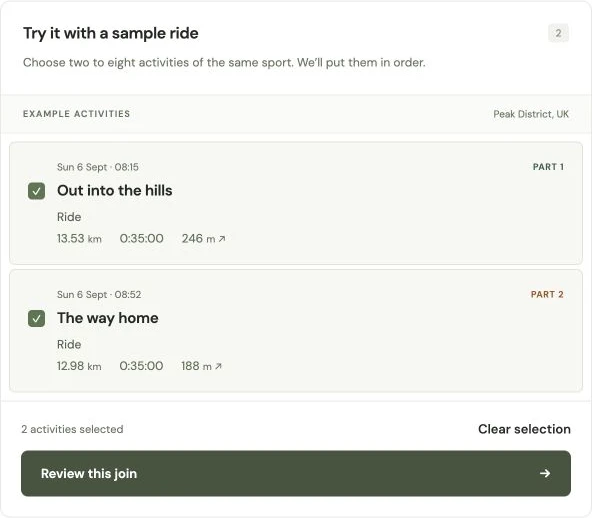
These two ride recordings total 26.51 km in the preview. Choose Review this join to check how the parts fit together. Review the route and every join
Open the preview and compare the map, times, distance, and gaps with what happened during your activity. Each original recording keeps its own boundary. Stitch does not draw a made-up GPS track between the end of one activity and the start of the next.
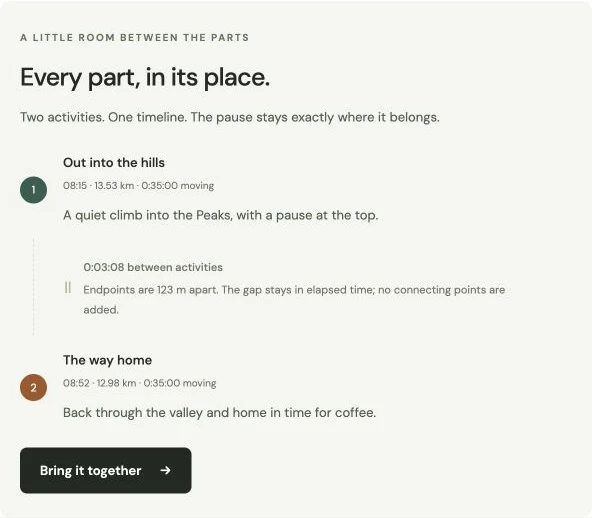
The pause stays in elapsed time. The 123 metres between endpoints are not turned into a recorded route or added distance. Download the merged file
GPS recordings download as GPX. A stitch containing recordings without GPS downloads as FIT, without adding any coordinates. Download the backup bundle too if you need reconstructed copies of each original activity. Creating or downloading a preview does not change your activities on Strava.
Confirm an upload when you’re ready
Stitch suggests a title by joining the original titles in time order and carries across any existing descriptions, separated by new lines. You can edit both fields before uploading.
Review the gap confirmation and your Strava default activity visibility, then choose Continue to upload. Download and inspect the backup bundle and save any available photos before removing originals yourself in Strava. Kudos and comments cannot be transferred or restored from these backups. See the duplicate-upload steps before removing anything.
Return to Stitch, confirm the originals’ removal, and choose Verify and upload to Strava. When the checks pass, that action starts the upload. Open the new activity in Strava to check its sport, map, totals, and visibility. Stitch cannot set “Only You” through Strava’s documented upload API. Direct uploads preserve the exact Strava sport type; check the sport if you import a downloaded file yourself.
What carries across when you combine activities?
A merged GPX or FIT is a new activity file. It can carry the recorded timeline and supported samples available from Strava, but it is not a complete copy of the original activity pages.
| Data | What to expect |
|---|---|
| GPS and timestamps | Original times and available positions, with separate boundaries for the activities. GPS is never invented for indoor recordings. |
| Elevation and sensors | Available elevation, temperature, heart rate, and cadence samples, at the precision the file supports. Recorded distance is included when complete across all selected activities; FIT also includes summary distances. |
| Distance, time, elevation totals | The preview uses source totals. Strava may recalculate them after import. |
| Power, original laps, pool lengths, workout sets, device metadata | Not transferred. FIT laps mark source activities; they do not reconstruct pool lengths or workout intervals. |
| Photos | Available photos can be saved in a separate photo ZIP. Check the files before removing originals, then add the photos manually to the merged activity in Strava. Photos are not included in GPX or FIT files. |
| Kudos and comments | Not transferred or backed up. Deleting originals loses their social history. |
FIT timer pauses mark the gaps between source recordings. Strava does not provide the original pause events within each activity, so those are not reconstructed from moving-time totals. Strava may calculate moving time differently after import.
What happens to pauses and missing sections?
Suppose you end the first activity at 10:35 and start the next at 10:38. If you were stopped for those three minutes, that is a real pause. Stitch keeps both timestamps instead of shifting the second activity backwards to hide the break.
If you were still cycling, that part of the route was not recorded. Stitch preserves the gap; it cannot know which road you took or how fast you travelled. A map can show the recorded parts together without turning the missing section into measured distance.
Moving time and elapsed time can therefore differ, and Strava’s imported totals may differ from the preview. Check the result against the activity you actually did. If the activities overlap in time, Stitch asks you to choose a different set instead of silently dropping points or counting both tracks.
What if Strava rejects the upload as a duplicate?
The combined activity contains data already present in your originals, so Strava may reject it as a duplicate. Strava’s guidance says the existing activities may need to be removed before the combined file can be uploaded.
Stitch never deletes an activity on Strava. Choose Continue to upload to check the originals and open the preparation steps. Download a backup bundle before removing anything. Save available photos in the separate photo ZIP and inspect both ZIPs. You can add those photos manually to the new activity in Strava. These backups cannot restore kudos or comments and do not include every original device field.
If you decide to proceed, remove the relevant original activities yourself in Strava. Return to Stitch, confirm their removal, and choose Verify and upload to Strava. Stitch checks that the originals are no longer available, then starts the upload. You can also keep the originals and retain the stitched file without uploading it.
Follow the Strava duplicate-upload guide to check whether an upload already succeeded, inspect your backups, and retry a confirmed duplicate.
A few more things to know
Does Stitch support all Strava activity types?
Yes. Stitch supports all Strava sport types, including runs, rides, swims, walks, hikes, e-bike rides, and indoor workouts.
Choose two to eight recorded activities of the same sport per stitch. Run and Trail Run, for example, are separate types. GPS is optional, but recorded timestamps are required. Manual entries and activities without a recorded timeline cannot be stitched.
Is Stitch free to use?
Yes. Free to use, always. Previewing, downloading, and uploading through Stitch are all included. You can connect Strava to use your own activities or explore the example preview without an account.
Can I merge GPX, FIT, or TCX files directly?
Stitch currently reads activities from your connected Strava account and exports GPX or FIT. It does not offer local file import. If your activity is still on your device, first sync the individual activities to Strava.
Can I combine a ride and a run?
No. Each stitch uses one exact sport type, so runs go with runs and rides go with rides. Mixed-sport sessions and simultaneous recordings from two devices are not supported.
Can I stitch indoor workouts or swims?
Yes, when Strava provides recorded timestamps. Stitch uses FIT if GPS is absent. It preserves available samples, but cannot recreate swimming lengths, strength sets, or data that Strava does not return. A manually entered duration alone is not a recorded timeline.
Will my private activities become public?
Stitch is privacy first. Your activity data and previews are available only to your connected account. Uploading creates a new Strava activity using your Strava account’s default visibility. Check that setting before uploading. Read how Stitch handles your data for storage, backups, and disconnecting.
Previews expire after 24 hours. Our interaction counts contain no activity data or identifiers that follow you between visits, and you can remove your connection and previews at any time.
Guides for your activity
Work through a split recording, check what carries across for your sport, or resolve a duplicate upload.